
ebt
Welcome to EBT Unlock Key & EBTsmart Unlock Key
Browser-based Bosch unlocking – no chip, no app, no motor disassembly.
Introduction
Thank you for purchasing the EBT Unlock Key and/or the EBTsmart Unlock Key.
- Your 25-digit licence key:
xxxxx-xxxxx-xxxxx-xxxxx-xxxxx - This instruction page
Note: If you purchased a multi-licence package, the included licences can be used for several separate bikes.
Important: Once a licence has been linked to a specific bike, it cannot be transferred to another bike later.
Which product do you have?
EBT Unlock Key is intended for many compatible Bosch Gen1 to Gen4 systems using BES1 or BES2.
EBTsmart Unlock Key is intended for compatible Bosch Smart System / BES3 bikes, including many systems with or without rim magnet.
Important compatibility note:
The EBT Unlock Key is not compatible with Bosch Gen1 HMI, Bosch Smart System / BES3 or ABS-equipped bikes.
The EBTsmart Unlock Key supports many compatible Smart System / BES3 bikes and also supports compatible ABS Smart System bikes up to 32 km/h only. The optional 45 km/h stage is not available with ABS.
Charging-port rule of thumb:
Round charging port = BES2 = EBT Unlock Key
Square charging port = BES3 / Bosch Smart System = EBTsmart Unlock Key
Supported browsers:
Open this page on a PC, Mac or Android smartphone using the latest version of:
- Google Chrome
- Microsoft Edge
- Apple Safari
Tip: You can check your browser version here: whatismybrowser.com
Requirements:
- Stable internet connection
- Up-to-date browser
- A proper USB data cable connected to your device and the bike / display
- The bike must recognize the USB connection correctly
Before you start:
Connect your powered-on e-bike via USB to your PC, Mac or Android smartphone.
Login
Let’s begin: Start here: Login
After opening the platform, you will typically see a message such as Current Active Licence Key: None together with the button Change Licence Key. Click it and enter your licence key.
Then follow the on-screen message asking you to select or connect your bike.
Click Connect.
Once the connection is established, the platform reads the bike information and shows the current status. You can then choose whether to unlock or re-lock the bike.
How the System Works
The general workflow is very similar for both products:
- Open the login page
- Enter your 25-digit licence key
- Connect the Bosch bike
- Read the current bike status
- Choose unlock or re-lock
EBT Unlock Key:
On many compatible Bosch Gen1 to Gen4 BES1 / BES2 systems, the 25 km/h speed limit is removed permanently until you reset the bike again. On supported Gen1 setups, display values remain correct. On many Gen2–Gen4 / BES2 systems, the displayed speed is typically about half of the real riding speed, and distance / mileage values may also differ while riding.
EBTsmart Unlock Key:
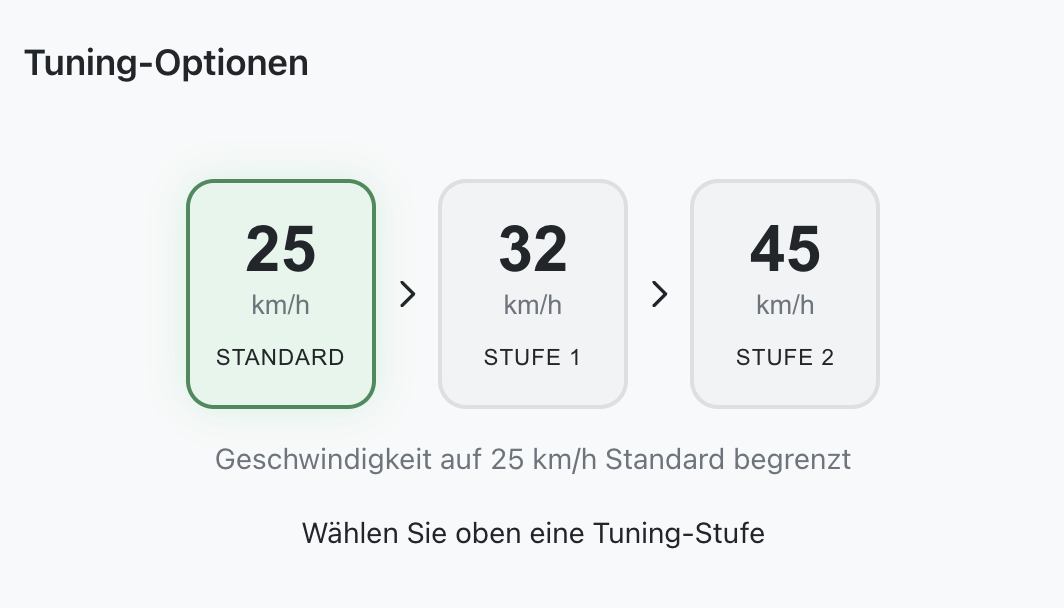
On compatible Bosch Smart System / BES3 bikes, Stage 1 raises motor support to 32 km/h while keeping speed, distance and mileage values correct. Depending on the supported bike configuration, an additional Stage 2 with support up to 45 km/h may be available. In that mode, displayed values are no longer accurate from around 22 km/h. On ABS-equipped Smart System bikes, only the 32 km/h stage is available.
Before You Unlock – Quick Compatibility Check
For EBT Unlock Key:
- Compatible with many Bosch Gen1, Gen2, Gen3 and Gen4 bikes on BES1 / BES2
- Not compatible with Gen1 HMI
- Not compatible with Bosch Smart System / BES3
- Not compatible with ABS-equipped bikes
For EBTsmart Unlock Key:
- Compatible with many Bosch Smart System / BES3 bikes
- Supports many configurations with or without rim magnet
- Supports many special Smart System setups depending on the exact configuration
- ABS: compatible only up to 32 km/h
- 45 km/h stage: not available on ABS bikes
Important for Bosch Gen4 riders:
Bosch Gen4 exists in two different system families.
Gen4 with round charging port = BES2 = EBT Unlock Key
Gen4 with square charging port = BES3 / Smart System = EBTsmart Unlock Key
Display Behaviour
EBT Unlock Key / BES1–BES2:
On supported Bosch Gen1 systems, display values remain correct.
On many Bosch Gen2, Gen3 and Gen4 / BES2 systems, the display typically shows about half of the real speed while riding. This is normal system behaviour and not a defect.
EBTsmart Unlock Key / BES3:
Stage 1 (up to 32 km/h): display values remain correct.
Stage 2 (up to 45 km/h): displayed values are no longer accurate from around 22 km/h.
Error Messages & Help
- Error: Your browser is not supported...
→ Please update your browser or switch to Chrome, Edge or Safari. - Error: Connection error...
→ Reload the page and try again. Also check your internet connection and make sure you are using a proper USB data cable, not a charging-only cable. - Error: Code invalid...
→ Please check the 25-digit licence key carefully. If you see the message Code Invalid, copy the code to the clipboard and paste it into the field. If necessary, first place the code in a text editor and copy it again from there. - Bike not recognized correctly...
→ Double-check that you are using the correct unlock product for your Bosch system. In particular, make sure you are not mixing up BES2 and BES3 / Smart System. - ABS bike but no 45 km/h option...
→ This is expected. On compatible ABS Smart System bikes, only the 32 km/h stage is supported.
More help: Step-by-Step Instructions & FAQ & Support