FAQ: EBT Unlock Key
EBT Unlock Key & EBTsmart Unlock Key – Full FAQ
This FAQ covers both the EBT Unlock Key for many compatible Bosch Gen1–Gen4 BES1 / BES2 bikes and the EBTsmart Unlock Key for compatible Bosch Smart System / BES3 bikes. Both are browser-based Bosch unlock solutions that work without a classic tuning chip, without motor disassembly and without local software installation.
Buy Bosch Tuning Licences Go to Login
Login: https://ebts.unlocked.bike/
Instructions: https://www.mountaintuning.com/pages/instructions
This is the central unlock platform for both the EBT Unlock Key and the EBTsmart Unlock Key.
1. General Information
What is the EBT Unlock Key?
The EBT Unlock Key is a browser-based Bosch unlocking solution for many compatible Gen1–Gen4 BES1 / BES2 bikes. It removes the factory 25 km/h speed limit without using a classic tuning chip.
What is the EBTsmart Unlock Key?
The EBTsmart Unlock Key is the browser-based unlocking solution for compatible Bosch Smart System / BES3 bikes, including many systems with and without rim magnet.
What makes these products different from classic tuning hardware?
Both products are fully digital licence-based solutions. No chip, no dongle, no app installation, no motor opening and no classic hardware installation are required.
How are they delivered?
Delivery is digital. You receive your licence information and instructions by email after purchase.
Are they visible on the bike?
No permanent classic tuning hardware is mounted on the bike. These are browser-based licence solutions.
2. Compatibility
Which Bosch systems are compatible with the EBT Unlock Key?
The EBT Unlock Key is intended for many compatible Bosch Gen1–Gen4 systems using BES1 or BES2. Bosch Gen1 with HMI display is not supported.
Does the EBT Unlock Key work with Bosch Smart System?
No. Bosch Smart System bikes use BES3 and require the EBTsmart Unlock Key instead.
Which Bosch systems are compatible with the EBTsmart Unlock Key?
The EBTsmart Unlock Key is intended for compatible Bosch Smart System / BES3 bikes, including many systems with and without rim magnet.
- Firmware: Currently approved up to Bosch Drive Unit firmware 20.27.0.
Does the EBT Unlock Key support ABS?
No. The EBT Unlock Key does not support ABS-equipped bikes.
Does the EBTsmart Unlock Key support ABS?
Yes, on compatible Bosch Smart System bikes with ABS, the 32 km/h mode is supported. The optional 45 km/h mode is not available with ABS.
How do I check whether my bike is BES2 or BES3?
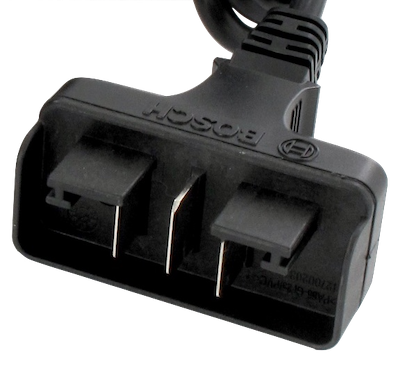
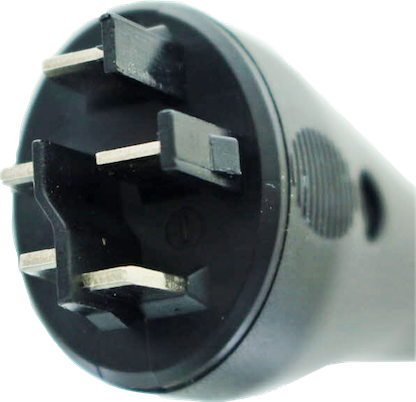
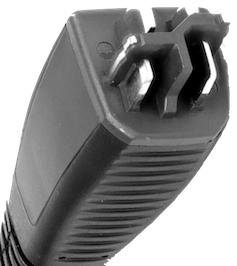
A practical quick check is the charging port shape and the overall system generation. In simplified terms, many older compatible Gen4 bikes belong to BES2, while Smart System bikes belong to BES3.
Which displays are supported?
For the EBT Unlock Key, the relevant Bosch BES1 / BES2 display environment includes systems with Intuvia, Purion, Kiox and Nyon, depending on the generation. Bosch Smart System displays and controls belong to the EBTsmart Unlock Key world.
3. Functionality & Use
What do I need to use the unlock?
You need a current browser, a stable internet connection, a suitable USB data cable and a compatible Bosch bike.
How does the unlock process work?
Connect the bike, open the browser-based tool, enter the licence key, confirm the connection and start the unlock or re-lock process.
How fast will the bike go after unlocking?
That depends on the bike, gearing, motor, rider weight, battery charge, tyre pressure, wind, terrain and other real-world factors. The unlock changes the software limit, but it does not override physics.
What exactly does the EBTsmart Unlock Key do?
In Stage 1, EBTsmart raises motor support to 32 km/h while keeping display values correct. Depending on the supported configuration, an additional Stage 2 with support up to 45 km/h can be selected.
What should I check after EBTsmart activation?
After activation, the riding profiles in the eBike Flow app should be checked and adjusted if necessary.
4. Licensing
Can I use one licence more than once?
A single licence is intended for one bike. Multi-licence packs are intended for several separate bikes.
Can I unlock one bike and later re-lock it?
Yes. On the same bike, you can switch between locked and unlocked status using the same licence.
Can I use the same code on another bike later?
No. Once the licence is linked to a specific bike, it cannot be transferred to another bike.
5. Display Behaviour
Does the display show correct speed with the EBT Unlock Key?
On Bosch Gen1 with Intuvia, display values remain correct. On many Gen2–Gen4 BES2 systems, displayed speed values are typically divided while riding.
Is the odometer accurate with the EBT Unlock Key?
On many Gen2–Gen4 systems, distance and mileage values may also deviate after unlocking.
Does EBTsmart show correct values?
Yes, in 32 km/h mode. In the optional 45 km/h mode, values are no longer shown correctly from around 22 km/h.
6. USB Connection & Cable
Which cable do I need?
Depending on the display or system, Mini-USB, Micro-USB or USB-C data cables may be required. Always use a real data cable, not a charging-only cable.
Do normal USB cables work?
Only if they support data transfer. Many inexpensive cables are charging-only cables and will not work reliably.
Can I use adapters or hubs?
A direct connection is generally the safer option.
7. Browser & Device Support
Which browsers work?
Current versions of Chrome, Edge and Safari are generally suitable.
Does it work on mobile devices?
Bosch-based unlocks are currently used on PC, Mac or Android smartphone, depending on the product and the connection setup.
What if my browser says it is not supported?
Update your browser or switch to a current version of Chrome, Edge or Safari and try again.
8. Re-Locking & Reversibility
Can I re-lock the bike?
Yes. Both the EBT Unlock Key and the EBTsmart Unlock Key are reversible on the same bike.
Is the unlock permanent?
The bike remains unlocked until you actively return it to the original state.
Can I switch back and forth as often as I want?
On the same bike, the licence can generally be used again for re-locking and re-unlocking.
9. Purchase Process
How do I buy?
Choose the matching licence option in the Bosch tuning collection and complete checkout.
What happens after purchase?
You receive the licence information and instructions by email. Delivery usually happens within a short time after payment confirmation.
What about bank transfer and Sofort?
For bank transfer and Sofort-based payment methods, the actual incoming payment must be confirmed first. Processing therefore depends on payment confirmation.
10. Multi-Licence / Workshop Use
Can I use multiple licences for customers, family or workshop use?
Yes. Multi-licence packs are intended for several bikes and are useful for families, workshops and multi-bike users.
Are larger licence packs available?
Yes. Depending on the product, several licence-pack sizes are available for users who need more than one bike to be unlocked.
11. Legal Considerations
Is tuning legal on public roads?
In many countries, use on public roads is not legal once the bike has been unlocked.
What are the possible risks?
Possible consequences may include loss of road approval, insurance issues, warranty consequences and legal problems in traffic.
Where is use generally considered acceptable?
As a general rule, only where local law clearly allows it – often meaning private property or non-public areas.
12. Resale & Transfer
Can I transfer a used code?
No. Once activated, a licence is bound to one specific bike and is not transferable to another bike.
Can I sell an unlocked bike?
Yes, but the buyer should be informed clearly that the bike has been tuned and may not be road legal for public-road use.
13. Firmware Updates
Does a Bosch firmware update automatically re-lock the bike?
Not necessarily. However, a Bosch update can influence the unlock behaviour and may require a new activation step afterwards.
Should I avoid updates?
If you want to keep the unlock working as expected, updates should be handled cautiously.
What is the safest update procedure?
Re-lock first, then install the manufacturer update, then activate the unlock again if appropriate. Updates should always be treated as being performed at your own risk.
14. Warranty & Support
Can tuning affect warranty?
Yes. Tuning can affect manufacturer warranty and warranty-related claims.
Where can I get help?
For help with activation or compatibility, please use the English support page: Support
Which information is most useful for support?
The most helpful details are your order number, product name, bike model, display or system type, the browser used, the exact error message and ideally a screenshot or short video.